Assembly Classics - The Snake Game (EN)
Nov 8, 2026
Everyone has played some version of the classic Snake game at some point!
Snake was a huge hit, especially in the 90s, and could be found on various cell phone models and the famous mini-games.
Like many other players, I was also part of the generation that grew up with those monochrome mini-games, and my favorite game was Snake.
So, when I decided to start the Assembly Classics project, Snake was the first game on my list to be developed.
About the Game
The Snake Game is a recreation of the classic Snake; the famous little snake game. Its goal is pretty simple: increase the snake's size without colliding with the game's walls or with itself.
My idea was to build a game as close to the original as possible, but with a few modern features, such as XBOX controller support.
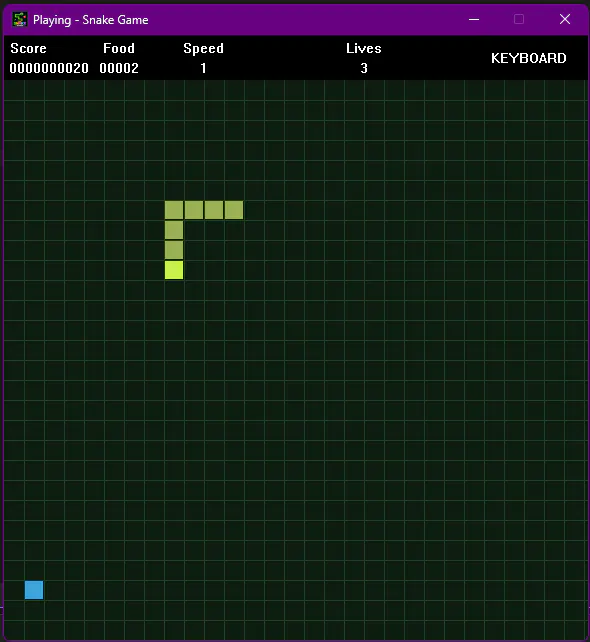
This is the look I settled on for the final version of the game:
Why Assembly?
Nowadays, game development comes with many tools that can help with the development process.
Engines like Unity, which includes ready-made physics and collision systems, as well as a variety of tools that make development easier, are very popular and help immensely when building games, so why not use this tool?
If you're expecting a technical reason for why I used Assembly instead of Unity, this might disappoint you, but this choice wasn't technical, it was personal.
I chose Assembly because it's a programming language I've always been fascinated by; I've always been very interested in it, but never had the opportunity to really study it until recently, and I don't regret it.
Even though I didn't have a technical reason for choosing it, there are many advantages to working with Assembly, and the main one is gaining a deeper understanding not only of how your game works, but also of how Operating Systems and programming languages in general work.
Microsoft Macro Assembler - MASM
One of the first things I learned when I started studying Assembly is that, unlike languages such as C, C#, and JavaScript, Assembly isn't a single language; there are several versions of Assembly that vary by architecture and manufacturer.
Within the X86_64 world, which is the standard architecture for computers, we have MASM, NASM, and FASM, for example, among many other variations.
These languages share the same basic instruction set, but their syntax and features may differ.
Take a look at the difference between a procedure written in MASM vs. NASM:
MASM - Microsoft Macro Assembler
.data
PUBLIC GetFoodCount
.code
GetFoodCount PROC
    mov rax, FoodCount
    ret
GetFoodCount ENDP
NASM - Netwide Assembler
global GetFoodCount
section .text
GetFoodCount:
    mov rax, FoodCount
    ret
As we mentioned, both have the same instructions, mov and ret, but the syntax is slightly different.
For The Snake Game, I chose to use MASM, from Microsoft, and this time the reason was technical. My initial intention with this project was to create native games for Windows using Win32, so it made sense to keep the entire ecosystem within Microsoft.
Development
With the assembler defined, it was time to start development, and with that came the first challenge: 32-bit vs. 64-bit.
I had already used MASM before developing Snake, when building a UI for a drawing application. However, that application was 32-bit.
For Snake, I chose to use 64-bit Assembly because it's a more modern architecture; nowadays, there are practically no purely 32-bit processors left.
While my familiarity with 32-bit MASM helped me move quickly through the project, choosing to use 64-bit MASM brought new challenges, starting with what we call an ABI.
Application Binary Interface - ABI
An ABI is a set of rules that defines how software communicates at the binary level.
As programmers, many of us have worked with APIs, which essentially have a set of rules that allow software, even when written in different languages, to communicate with each other.
An ABI is the same thing, but instead of communication between pieces of code, it focuses on communication between a binary and other binaries, libraries, the operating system, and indirectly, the hardware.
Among all the ABI rules, one of the most visible in the code is the calling convention, that is, how called functions receive parameters.
On Windows, for example, the ABI used is Microsoft x64, which has the following calling convention:
RCX  -> 1st Parameter
RDX  -> 2nd Parameter
R8   -> 3rd Parameter
R9   -> 4th Parameter
Stack -> 5th Parameter onward
Consider, for example, the fictional function SetError(int code, string message);
In MASM, it would be called like this:
mov RCX, code
mov RDX, message
call SetError
Notice that the first parameter (code) was placed in RCX, and the second parameter (message) was placed in RDX.
This is important because 64-bit Windows will look for the parameters in these registers when it detects the call to SetError; the calling convention allows the binary to communicate in the way the system expects.
Wrapping up
That's all for our first post!
With the ABI out of the way, development started moving forward, and the game began to take shape. The first visible milestone was creating the window using Win32.
In our next post, we'll see how this window was created, along with the difficulties encountered along the way. But if you're curious about the code or want to download the game, just check out our official website.